
Import a recipe from Instagram.
Copy an Instagram reel link, paste it into Family Plates, and review the draft before saving it to your recipe library.
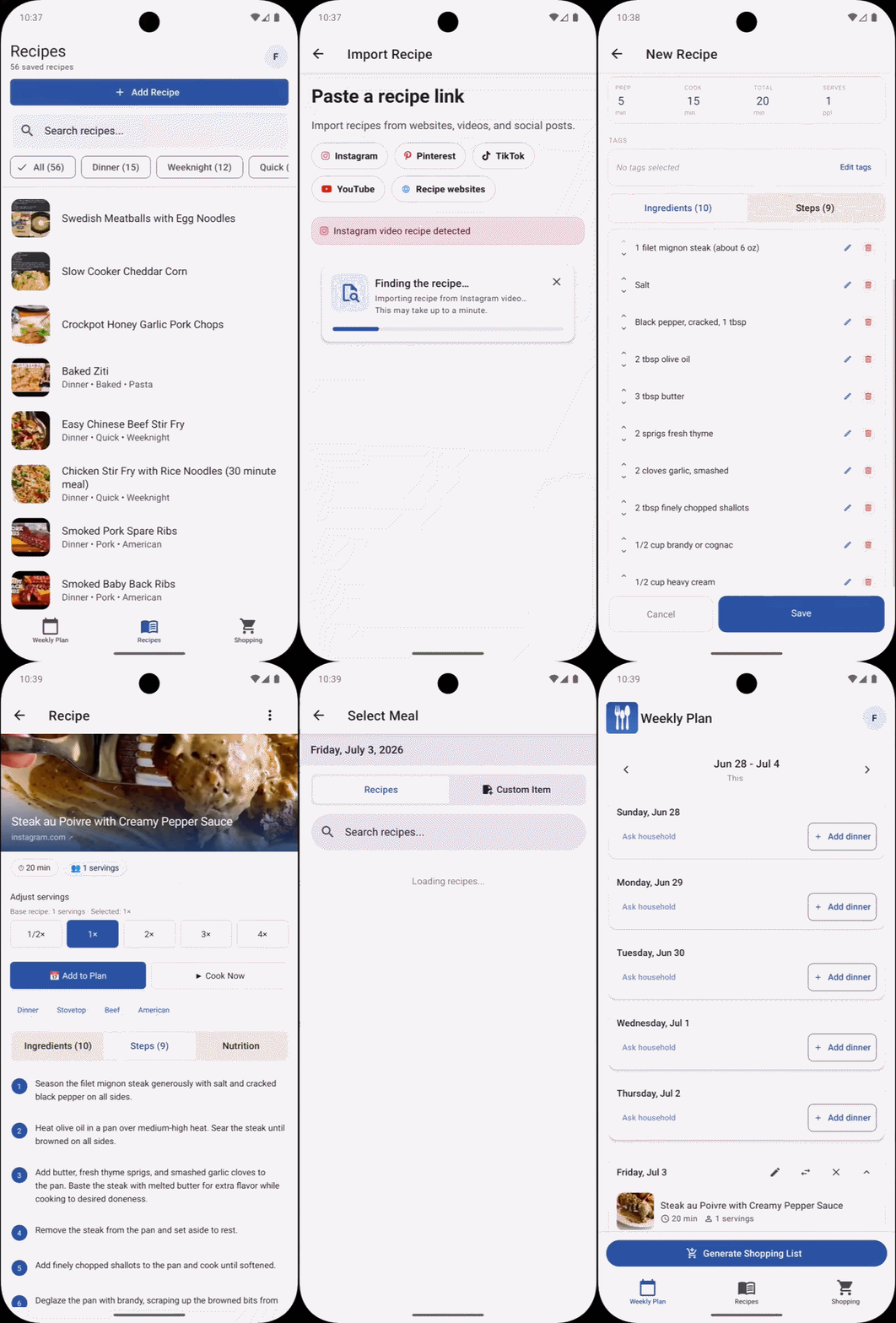
Turn a reel into a recipe draft.
Family Plates helps create the recipe structure, but you stay in control before it is saved.
-
Copy the Instagram link
From Instagram, copy the link for the reel or post that contains the recipe.
-
Start an import
In Family Plates, choose the option to import from a link.
-
Paste the link
Paste the Instagram URL and let Family Plates create a recipe draft.
-
Review the draft
Check the title, image, ingredients, timing, and steps. Adjust anything that needs attention.
-
Save the recipe
Once the draft looks right, save it to your recipe library and add it to a meal plan when you are ready.
Note: Imported recipes should be reviewed before saving. Ingredients, amounts, timing, and instructions may need small edits depending on the video.